History: HDTDI-keycontent.org
Preview of version: 11
This is the story of KeyContent.org. Please feel free to let me know what you think or if you have any questions!
About ))KeyContent.org((
))KeyContent.orghttp://www.keycontent.org — is free, open-content, collaborative effort and describe what it means to be a content developer. The site is " class="wiki wikinew text-danger tips"> (KC.o) — http://www.keycontent.org — is free, open-content, collaborative effort and describe what it means to be a content developer. The site is a whiteboard to express your ideas, share your experiences, and ask your questions. TheKeyContent.org(( site was launched in February 2005 and has undergone 2 major UI revisions.
You can read more about Tiki's role in creating a wiki-based portal for ))KeyContent.org(( here. This is part of a presentation made at the 2006 TriXML conference in Raleigh, NC, USA.
As of July 2006, KC.o is currently running:
- Tiki 1.9.2 (pending upgrade to 1.9.4)
- MySQL 4.1.19
- PHP 4.4.2
- Host: http://www.bluehost.com/, running Apache 1.3.36
Template Changes
The current KC.o template reflects a vastly customized set of template files and stylesheets. Our theme has undergone three major revisions:
- Initially, we started with the geo-light theme. This theme was used for testing and the pre-launch version of the site. I used this theme to "get my feet wet" in Tiki customization.
- The KC.o version 1 template was based on the geo-light template, but included several major changes.
- In early 2006 we created an entirely new template and color scheme.
KeyContent.org
||Initial|Version 1.0|Version 2
 that we did not use.
!!Validation
The KC.o template validates correctly for [http://validator.w3.org/check?uri=http://www.keycontent.org/index.php|XHTL] and [http://jigsaw.w3.org/css-validator/validator?uri=http://www.keycontent.org/styles/key_content.css|CSS]. Most of the changes I made have already been reflected in the last round of Tiki updates (1.9.4).
!!Accessibilty
The KC.o template meets [http://www.w3.org/WAI/WCAG1A-Conformance|WAI-A] and [http://www.contentquality.com/mynewtester/cynthia.exe?Url1=http://www.keycontent.org|Section 508] requirements for accessiblity. The major accessibility enhancments include:
*Changing TABLEs to DIVs. We still use quite a few HTML tables for layout. My ultimate goal is to move __all__ of these to DIVs
*Table enhancements:
**Added captions and headers to tables
**Added summaries to tables
*Added title and alt attributes to all elements
*Skip header link
*Access keys
!!Modules
Currently we use the following modules:
*Login module (customized to include Since Last Visit)
*Last Modified Pages module (customized to include Quick Edit)
*Last Directory
*Upcoming Events
!!!Login Module
I created a custom Login module that included the Since Last Visit module. After logging in, users are automatically shown the newest information, since their last visit:
{img "Click for full-size image.")
<input type="hidden" name="su" value="1" />
<input type="text" name="username" id="login-switchuser" size="15"
value="Change user{/tr}" alt="Change to a different user{/tr}." >
<input type="submit" name="actsu" value="Set{/tr}" />
</form>
{/if}
{menu id=50}
<a class="separator" href="javascript:icntoggle('whatsnew');" title="Toggle options">
<img src="img/icons/fo.gif" border="0" name="whatsnewicn" alt=''/>
href="tiki-calendar.php?viewlist=table&viewmode=week"
title="Upcoming Events{/tr}">Upcoming Events{/tr}</a>
{foreach key=pos item=slvn_item from=$slvn_info.items}
{if $slvn_item.count > 0 }
{assign var=cname value=$slvn_item.cname}
<a class="separator" href="javascript:icntoggle('{$cname}');">
<img src="img/icons/fo.gif" border="0" name="{$cname}icn" alt='' />
{$slvn_item.label}</a>
{else}style="display:block;"{/if}>
{section name=ix loop=$slvn_item.list}
<img src="kc/icons/spacer.gif" alt="" width="15" height="1" border="0" />
<span class="module">{$smarty.section.ix.index_next}</span>
<a class="linkmodule" href="{$slvn_item.listix.href|escape}"
title="{$slvn_item.listix.title|escape}">
{if $slvn_item.listix.label == ''}-{else}
{$slvn_item.listix.label|escape|truncate:20:"...":true}{/if}
</a><br />
{/section}
{/if}
{/foreach}
{literal}<{/literal}script language='Javascript' type='text/javascript'>
setfolderstate('whatsnew', 'd');
{literal}<{/literal}/script>
<a class='separator' href="tiki-logout.php" title="Log Out{/tr}">
<img src="kc/icons/logout.gif" border="0" alt='Logout button{/tr}.' />
Log Out{/tr}</a>
{else}
<div class="module"><form name="loginbox" action="{$login_url}" method="post"
{if $feature_challenge eq 'y'} >
<input type="text" name="user" id="login-user"
size="15" value="Username" alt="Enter your KeyContent.org username{/tr}." >
<input type="password" name="pass" id="login-pass" size="15"
value="Password" alt="Enter your password." >
<input type="submit" name="login" value="Log In{/tr}" />
{if $rememberme ne 'disabled'}<input type="checkbox"
name="rme" id="login-remember" value="on"/>
<label for="login-remember"> Remember me{/tr}</label> {/if}<br />
{if $forgotPass eq 'y' and $allowRegister eq 'y' and $change_password eq 'y'}
<a class="link" href="tiki-remind_password.php"
title="Click here if you've forgotten your password{/tr}">
Forget your password?{/tr}</a><br />
<a href="tiki-register.php" class="link"
title="Click here to register{/tr}">Sign up{/tr}</a> (free) to see more.
{/if}
</form>
{/if}
{CODE}
Last Modified Page
After logging in, users can quickly create a new wiki page by using the Quick Edit module. I included this module within the Last Modified Page module:

This was a simple edit to the mod-last_modif_pages.tpl template:

{if !$user} <a href="tiki-page.php?pageName=Key+Collaboration+Request" class="linkmodule" title="{tr}Start a new Key Article{/tr}."> {tr}Start new article{/tr} <img src="kc/icons/more.gif" alt="{tr}Start a new Key Article{/tr}" width="19" height="10" border="0" align="bottom" /></a> {else}{if $tiki_p_edit eq 'y'} <form method="get" action="tiki-editpage.php"> {if $categId}<input type="hidden" name="categId" value="{$categId}" />{/if}
Customizations
UI changes
The overwhelming number of changes to KC.o have been for UI and usability. Most require only tweaks and additions to the template files.
Click to sort
I added a small sort image ( ) to all of the list tables. This allows users to see how the current view is being sorted. This is a commong UI element on most operating systems and users are accusomed to seeing them in lists.
For example, here is the sort image in the tiki-listpages:
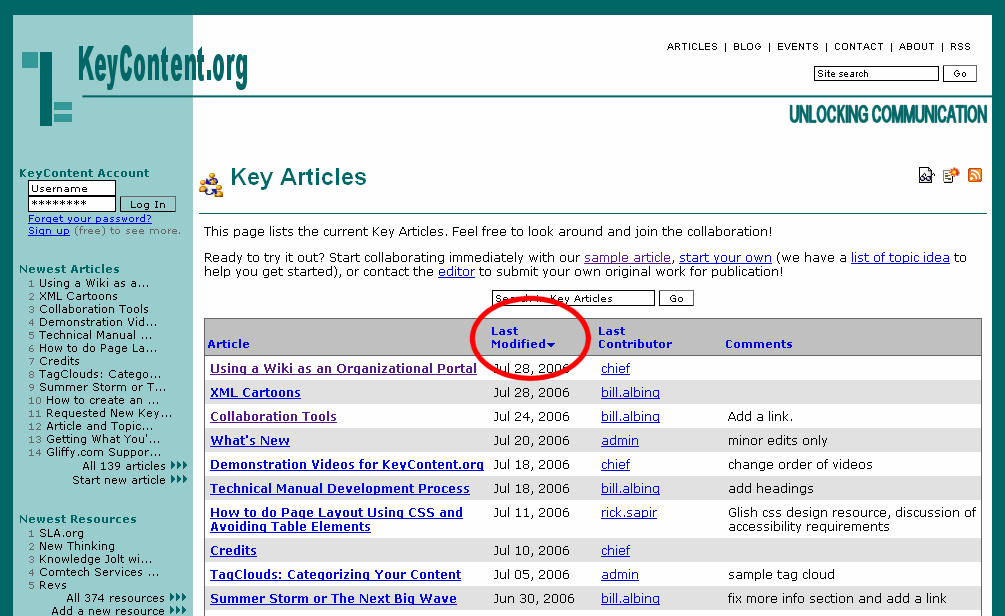
I simply created two small images (sort_asc.gif and sort_des.gif) and modified the template file:
<img src="{if $sort_mode eq 'description_desc'}sort_desc.gif{elseif $sort_mode eq 'description_asc'}sort_asc.gif{else}spacer.gif{/if}" alt="{tr}Click to sort{/tr}" width="10" height="6" border="0" />
Capthca for anti-spam
All form submissions are protected by Capthca images. We use the web-based http://www.protectwebform.com service. The service is very easy to implement and requires only simple cut-and-paste additions to the TPL template file and its associated PHP file.
An example of our implementation can bee seen here. This is a customization of the tiki-directory_add_site file.

What's next
My future plans for KC.o include:
- Upgrading to the current Tiki version.
- Add structured blogging and microcontent
History
| Information | Version | |||||
|---|---|---|---|---|---|---|
| drsassafras Mass search and replace | 22 | |||||
| drsassafras Mass search and replace | 21 | |||||
| drsassafras Mass search and replace | 20 | |||||
| drsassafras Mass search and replace | 19 | |||||
| drsassafras Mass search and replace | 18 | |||||
| drsassafras Mass search and replace | 17 | |||||
| drsassafras Mass search and replace | 16 | |||||
| Gary Cunningham-Lee Syntax used for dash before causes strikethrough in Tiki 3, so -- changed to -. | 15 | |||||
| Kissaki fix img links | 14 | |||||
| Rick Sapir / Tiki for Smarties | 13 | |||||
| Rick Sapir / Tiki for Smarties | 12 | |||||
| Rick Sapir / Tiki for Smarties | 11 | |||||
| Rick Sapir / Tiki for Smarties | 10 | |||||
| Rick Sapir / Tiki for Smarties | 9 | |||||
| Rick Sapir / Tiki for Smarties | 8 | |||||
| Rick Sapir / Tiki for Smarties | 7 | |||||
| Rick Sapir / Tiki for Smarties | 6 | |||||
| Rick Sapir / Tiki for Smarties | 5 | |||||
| Rick Sapir / Tiki for Smarties Updated the story of KCo | 4 | |||||
| Rick Sapir / Tiki for Smarties added some sample images | 3 | |||||
| Rick Sapir / Tiki for Smarties | 2 | |||||
| Rick Sapir / Tiki for Smarties initial page | 1 | |||||